Learning to code in 2026 feels very different compared to just a few years ago. Back then, beginners struggled with confusing tutorials, outdated documentation, and long hours stuck on tiny errors. Now, thanks to AI tools for learning coding, the journey has become smoother, faster, and honestly more enjoyable.
If you’re just starting your programming journey, you’re in a great era. AI isn’t just helping professionals anymore—it’s actively teaching beginners step by step, almost like a personal tutor sitting next to you.
In this guide, we’ll explore the best AI coding tools, how they help beginners, and how you can use them effectively while learning. We’ll also include a comparison table so you can choose the right tool for your needs.
Why AI Tools Matter for Beginners in 2026
Before jumping into tools, let’s understand the real benefit.
Traditional coding learning required:
- Watching long videos
- Reading heavy documentation
- Debugging errors alone
- Searching Stack Overflow endlessly
But modern AI tools for learning coding change everything.
Now you can:
- Ask questions in simple English
- Get instant code explanations
- Debug errors automatically
- Build mini projects step-by-step
Basically, AI acts like a 24/7 coding buddy who never gets tired.
At bizmetech.site, we’ve seen how beginners improve 2–3x faster when they combine practice with AI assistance.
Top AI Tools for Learning Coding (2026 Edition)
Let’s break down the most useful tools beginners should know in 2026.
1. GitHub Copilot X
One of the most popular AI coding assistants, GitHub Copilot X helps you write code inside your editor.
Key Features:
- Auto-completes code in real-time
- Suggests entire functions
- Supports Python, JavaScript, C++, and more
- Explains code in simple language
Best for: Beginners who are already trying small projects in VS Code or similar editors.
Copilot is like having a senior developer guiding your every move. Sometimes it feels like magic, but it’s just smart AI prediction.
2. ChatGPT for Coding Help
Yes, conversational AI like ChatGPT is one of the strongest AI tools for learning coding.
What you can do:
- Ask “Explain loops in Python like I’m 10”
- Debug your broken code
- Learn step-by-step logic building
- Practice interview questions
The biggest advantage is simplicity. You don’t need to know technical terms. Just ask in plain English.
For example:
“Why is my code not working?”
And you’ll get a beginner-friendly explanation instantly.
3. Replit AI
Replit AI is a browser-based coding platform with built-in AI support.
Features:
- Instant coding environment (no setup needed)
- AI code generation
- Project hosting for beginners
- Real-time collaboration
This is perfect for students who don’t want to install heavy software. You just open your browser and start coding.
4. Amazon CodeWhisperer
Amazon’s AI coding assistant is powerful for structured learning.
Highlights:
- Secure code suggestions
- Great for Python and cloud-based projects
- Good integration with AWS tools
- Beginner-friendly explanations
It’s especially helpful if you’re planning to move toward cloud computing later.
5. Codeium
Codeium is a fast-growing AI autocomplete tool and a strong alternative to Copilot.
Why beginners love it:
- Free access for most features
- Fast suggestions
- Easy integration with popular editors
- Lightweight and simple UI
If you’re just starting and don’t want to spend money, Codeium is a solid choice.
Comparison Table of AI Coding Tools (2026)
Here’s a simple comparison to help you choose:
| Tool Name | Best For Beginners | Key Strengths | Ease of Use | Cost |
|---|---|---|---|---|
| GitHub Copilot X | Medium | Smart autocomplete, deep integration | Easy | Paid |
| ChatGPT | High | Explanations, debugging help | Very Easy | Free/Paid |
| Replit AI | High | Browser coding + AI assistant | Very Easy | Freemium |
| Amazon CodeWhisperer | Medium | Secure coding + AWS support | Medium | Free |
| Codeium | High | Fast autocomplete, free access | Easy | Free |
Step-by-Step: How to Learn Coding Using AI Tools
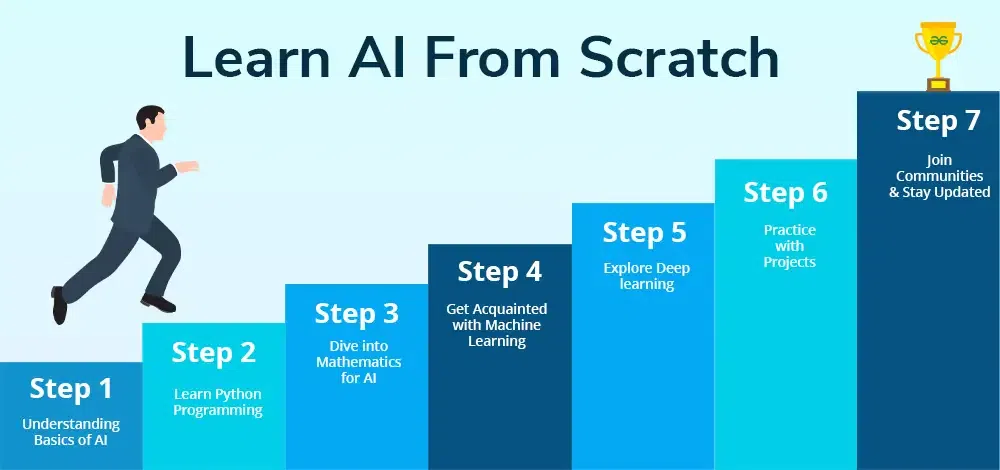
If you’re a complete beginner, here’s a simple roadmap you can follow.
Step 1: Start with Basics
Choose a language like Python or JavaScript. Use ChatGPT to understand:
- Variables
- Loops
- Functions
Ask simple questions daily.
Step 2: Practice in Browser Tools
Use platforms like Replit AI to write your first programs. Don’t worry about mistakes—AI will help you fix them.
Step 3: Build Small Projects
Try projects like:
- Calculator
- To-do list app
- Simple game
AI tools will guide you step-by-step. This is where real learning happens.
Step 4: Debug with AI Assistance
Whenever you face errors, copy the code into ChatGPT or Copilot and ask:
“What’s wrong here?”
You’ll learn faster by understanding your mistakes.
Step 5: Move to Real Projects
Once confident, start building:
- Websites
- APIs
- Automation scripts
At this stage, AI becomes your assistant—not your teacher.
Tips for Using AI Coding Tools Effectively
AI tools are powerful, but you still need the right approach.
Here are some student-friendly tips:
- Don’t copy code blindly—understand it first
- Practice daily, even 20–30 minutes
- Ask “why” not just “how”
- Combine videos + AI for better learning
- Build small things consistently
And honestly, don’t rush. Coding is like learning a new language—it takes time.
Sometimes you might feel stuck and think “I can’t do this.” But trust me, every developer has been there.
Common Mistakes Beginners Make
Let’s be real for a moment. Beginners often make a few simple mistakes:
- Relying too much on AI without learning logic
- Skipping basics and jumping to advanced topics
- Not practicing enough
- Giving up too early when errors appear
One small advice: consistency beats intensity every time. Even 1 hour daily is better than 10 hours once a week.
Also, remember—AI is your helper, not your replacement.
Why bizmetech.site Recommends AI Learning Tools
At bizmetech.site, we focus on modern learning methods that actually help students grow faster.
AI tools for learning coding are not just trends—they are becoming essential in 2026. Whether you’re a school student, university learner, or self-learner, these tools reduce frustration and increase understanding.
We recommend combining AI tools with real practice so you don’t just memorize code, but actually understand it.
Final Thoughts
Learning coding in 2026 is easier than ever, thanks to powerful AI tools for learning coding. From ChatGPT to GitHub Copilot X, every tool plays a unique role in your journey.
If you’re a beginner, don’t overthink. Just start small, stay consistent, and let AI guide you when needed.
And remember—every expert was once a beginner who refused to quit, even when their code didn’t work the first time (happens to everyone, even pros 😄).